
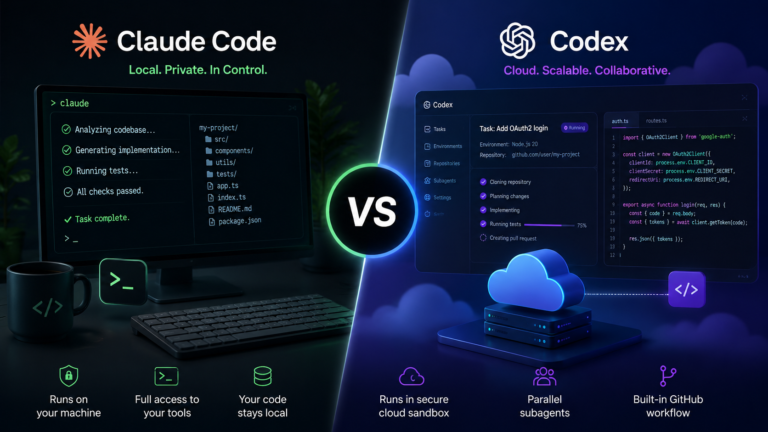

Most developers searching claude code vs codex already know both tools exist — what they can’t find anywhere is an honest answer to the question that actually matters: which one is worth paying for, and why? Every comparison article shows a pricing table. Not one shows a real production cost, a failure case, or a straight answer on what happens to your code when it leaves your machine.
This guide covers exactly that.To be honest, procrastination is the one thing I keep trying to break and keep stumbling over. I promise myself I will tackle the assignment first thing in the morning, and then somehow it is 11 p.m. and I am doom-scrolling on my phone. The weird part is the work itself is never as awful as the dread that comes before it — the moment I actually pull up the document, the opening paragraph tends to appear within about ten minutes.
And what really gets to me is all that comes before then, the anxiety left behind, the false starts, the guilt of time lost forever. Procrastination, as far as I am concerned, isn’t about being lazy. It’s about not wanting to feel the pain of beginning.
Why This Choice Is Harder Than It Looks
Most developers assume this is a simple “better or worse” comparison — one tool wins, the other loses. However, in reality, both these strategies deal with entirely different problems. This is where the point at hand comes to fruition.
Autocomplete Tools vs Agentic Coding Tools: The Key Difference
Claude Code and Codex are not autocomplete tools. Unlike GitHub Copilot, which suggests the next line as you type, both of these tools operate as agents. You describe a task in plain English — “add OAuth2 login with password reset” — and the agent plans an approach, writes code across multiple files, runs your test suite, and iterates until the task passes or it hits a wall.
That shift changes everything about how you evaluate them. Speed of suggestions stops mattering. What matters instead is output quality, token cost per task, how much supervision the agent needs, and whether the tool’s workflow fits how your team actually writes software.

The Core Architecture Split: Local Terminal vs Cloud Sandbox
It is the one thing that makes the most difference between these two instruments, and everything else that is compared follows from this.
Claude Code runs as a CLI tool on your local machine. It reads your codebase directly, runs shell commands, commits to Git, and executes scripts — all within your own environment. Codex, by contrast, spins up isolated cloud containers on OpenAI’s servers for each task.You provide it with a URL to clone from, along with the task instructions, and it performs the action on the cloud and provides you with the output.
None is clearly better than the other, but there are certainly consequences for each choice when we consider costs, security, simplicity of setup, and the system’s response to mistakes.
What Is Claude Code? What Is OpenAI Codex? (2026 Versions)
Before comparing features, it’s worth being precise about what each product actually is in 2026 — because both have changed significantly from their original releases.
Claude Code in 2026: What It Is and How It Works
Claude Code is Anthropic’s agentic coding tool. You install it via npm, point it at a project directory, and it operates directly on your files through a terminal interface. Since May 28, 2026, it defaults to Claude Opus 4.8 — Anthropic’s most capable model. Earlier in 2026 it ran Opus 4.7, which scored 87.6% on SWE-bench Verified.
Configuration happens through a CLAUDE.md file in your project root. This file tells the agent how to navigate your codebase, which commands to run, and which conventions to follow. Claude Code works with any IDE, any framework, and any package manager — because it runs on your machine, it inherits your entire existing toolchain.
OpenAI Codex in 2026: What It Is and How It Works
The version of Codex under discussion now is not the first version that came out in 2021 when it was powered by GPT-3. The current version of Codex is an agentic cloud coding platform that works via ChatGPT powered by GPT-5.5 locally and GPT-5.3-Codex in the cloud. The platform runs on desktop apps such as macOS, CLI, and IDE plugins like VS Code, Cursor, and Windsurf.
Codex reached a major milestone in June 2026: its subagents feature went GA, enabling users to run multiple parallel coding tasks simultaneously in isolated cloud containers. Configuration happens through an AGENTS.md file. No local dev environment is required — you provide a repo URL, define the task, and Codex handles everything in the cloud.
CLAUDE.md versus AGENTS.md: Functionality and Importance
Both CLAUDE.md and AGENTS.md share a common core function, which is that of providing the agent with instructions on its behavior within your code base. But there are differences enough to warrant migration.
The CLAUDE.md deals more with filesystem conventions, command sequences, and code style guidelines. The AGENTS.md usually pays more attention to defining tasks, setting up the environment, and automating the GitHub workflow. In moving from one computer system to the other, simply renaming the file would not be enough since all commands will need to be mapped into their corresponding counterparts on the new system.
Claude Code vs Codex: Features, Models & Real Performance Compared
Now that the architecture is clear, here’s how the tools stack up on the dimensions that actually affect your daily work.
Model Comparison: Claude Opus 4.8 vs GPT-5.5
On SWE-bench Verified — the benchmark that tests an AI’s ability to fix real GitHub issues — GPT-5.5 scores 88.7% and Claude Opus 4.7 scores 87.6%. That 1.1% gap sounds small, but on a benchmark this hard, it represents a meaningful number of tasks where GPT-5.5 succeeds and Opus 4.7 doesn’t.
Terminal-Bench, which measures performance on CLI-based agentic tasks (and is arguably more relevant for tools that run in a terminal), shows GPT-5.5 at 82.7%. Anthropic has not published a Terminal-Bench score for Claude Code. For context on ecosystem scale: Claude Code writes approximately 326,000 commits per day across all users — a signal of how deeply the tool has been adopted in production workflows.
What do these benchmarks mean for you in practice? A 1–2% benchmark difference translates to roughly one additional task failure per 50–100 delegated tasks. For most developers, that’s not a deciding factor. Workflow fit, cost, and security matter far more than marginal benchmark differences.
Parallel Tasks and Subagents: How Each Handles Multi-Tasking
Intermediate developers delegating serious work to AI agents quickly discover that single-task workflows bottleneck productivity. Both tools address this, though differently.
Claude Code supports multiple simultaneous terminal sessions.You use an individual terminal window for each process, directing it to your codebase(s). While allowing full control, it demands that you pay close attention to ensure that the processes do not interfere with each other.
Codex subagents, now GA as of June 2026, take a more automated approach. You define multiple tasks in a queue, and Codex spins up isolated cloud containers for each one in parallel. Results come back asynchronously when each task completes. This is genuinely powerful for teams with repetitive, well-defined task patterns — feature branches, test runs, documentation generation.
GitHub Integration and Workflow Automation
Codex’s GitHub integration is tighter out of the box. You can assign GitHub issues directly to Codex agents, and the tool generates automated pull requests when tasks complete. For teams with well-structured issue trackers, this creates a nearly automated ticket-to-PR pipeline.
Claude Code’s Git integration works through terminal commands the agent executes on your behalf. It’s more flexible — the agent can run any Git operation — but less automated. You still review and push changes manually. This actually suits many senior developers who want to inspect every commit before it hits the remote.
Language-Specific Performance: Python, TypeScript, Go
On Python and TypeScript (the most common languages in both tools’ user base), output quality is comparable between tools. Go and Rust show more variance — Claude Code tends to produce more idiomatic Go, while Codex performs better on TypeScript React components in testing scenarios reported by the developer community. A comprehensive comparative analysis of both languages is not possible in the framework of this paper; however, it makes sense to conduct a 30-minute trial in your native language before making any choice.
Real Cost Comparison: What You’ll Actually Pay After 30 Days
This is the section every other comparison article skips. Here’s what the costs actually look like when you move past the marketing pricing page.
Pricing Tiers Decoded: What Each Plan Actually Gets You
Claude Code:
- Pro ($20/mo): Access to Claude Code with rate limits. Fine for light evaluation — not enough for daily production use. Heavy sessions hit limits within a few hours of serious work.
- Max ($100/mo): 5x the usage of Pro. This is the realistic entry point for developers using Claude Code as their primary tool. Includes access to Opus 4.8 by default.
OpenAI Codex:
- ChatGPT Plus ($20/mo): Codex access included. Rate-limited — similar caveats to Claude Code Pro.
- ChatGPT Pro ($200/mo): Unlimited Codex usage. The realistic tier for production-volume use.
At entry level, Codex wins — it’s bundled into a plan many developers already pay for. At production volume, Claude Code Max ($100) is meaningfully cheaper than ChatGPT Pro ($200).
Token Consumption in Practice: Which Tool Costs More Per Task?
Claude Code’s terminal-based sessions tend to consume more tokens per interaction because the agent loads local context — your full file tree, recent Git history, test output — before responding. This produces better-informed outputs but drives up costs on complex tasks.
Codex’s sandboxed approach manages context differently. Each task starts clean, which reduces token overhead for well-scoped tasks. However, if a task requires context from multiple previous sessions, you pay to re-establish that context each time.
A rough estimate for 10 feature-level tasks per week: on Claude Code Max ($100/mo plan), a heavy user reports hitting approximately 60–70% of plan limits with that volume. On ChatGPT Pro ($200/mo), the same volume leaves significant headroom. For budget-conscious individual developers, Claude Code Max delivers more value per dollar at mid-volume usage.
Hidden Costs: Setup Time, Toolchain Overhead, and Switching Cost
Claude Code’s hidden cost is setup complexity. If your local development environment is misconfigured — wrong Node version, missing environment variables, broken package manager — Claude Code inherits that chaos. First-time setup for developers new to terminal workflows can add hours before the tool becomes productive.
Codex’s hidden cost is context loss. Because each sandboxed task starts fresh, long-running projects require carefully maintained AGENTS.md files that carry forward all the context Codex needs. Maintaining that file well takes ongoing discipline.
Switching between tools costs more than most developers expect. A typical CLAUDE.md file for a mid-sized project takes 1–3 hours to properly map to AGENTS.md format. Budget for this if you’re evaluating a switch.
Security & Data Privacy: Does Your Code Leave Your Machine?
This question doesn’t appear in any competitor article. However, for a growing number of developers and teams in the US, it’s the single most important factor in this decision.
Claude Code: Your Code Never Leaves Your Machine
Claude Code runs locally. The only data that leaves your machine is the specific context you explicitly include in a prompt — the code snippet, file, or command output you ask the agent to reason about. Your entire codebase, credentials, and local environment stay on your hardware.
This matters enormously for developers working on NDA-protected code, proprietary algorithms, or applications in regulated industries. Fintech, healthcare, legal tech, and government contractors in the US frequently operate under data handling requirements that would flag code being processed in a third-party cloud environment. For these developers, Claude Code is the only viable option — not because it’s better, but because Codex is disqualifying.
Codex Cloud Execution: What OpenAI Sees and What It Doesn’t
When you run a task in Codex, OpenAI clones your specified repository into an isolated cloud container on their infrastructure. OpenAI’s data usage policy for Codex tasks states that code processed through the API is not used to train models (as of current policy). However, the code does transit OpenAI’s servers, which introduces exposure that many enterprise security teams won’t accept.
For open source projects, personal side projects, or applications with no proprietary IP, this distinction is largely irrelevant. For anything under an NDA or involving customer data, read OpenAI’s current data retention and processing policy carefully before proceeding.

Which to Choose If You Work With Proprietary or Regulated Code
The decision tree is straightforward:
- Open source project or personal tool → either tool works fine
- Bootstrapped SaaS with no investor IP restrictions → either tool, check your terms of service
- VC-backed startup with standard IP assignment agreements → verify with your legal team before using Codex
- Enterprise / regulated industry (finance, healthcare, government) → Claude Code by default; Codex requires explicit legal clearance
Which Should You Choose? A Decision Guide by Role and Workflow
Choose Codex If…
- You’re a beginner with no local dev environment configured and don’t want to set one up
- You work primarily on open source, personal projects, or repos with no IP sensitivity
- You want async background tasks running while you focus on other work
- You’re already paying for ChatGPT Plus or Pro and want to avoid a second subscription
- Your workflow revolves around GitHub issues and automated PR generation
Choose Claude Code If…
- You work with proprietary, NDA-protected, or client-owned code
- You’re an intermediate-to-senior developer comfortable with terminal workflows
- You want maximum visibility into and control over every action the agent takes
- You work in finance, healthcare, legal tech, or any regulated US industry
- Your team already has a strong local dev environment standardized across machines
Can You Use Both? The Dual-Agent Workflow
Here’s an angle no other article covers: Claude Code and Codex don’t have to compete. They serve different moments in a developer’s workflow, and combining them deliberately can extract the best of both.
Use Codex for asynchronous background tasks — long-running feature builds, test generation, documentation, repetitive refactors across many files. Spin these up when you start your day and let them run while you focus elsewhere.
Use Claude Code for interactive terminal sessions — debugging sessions where you need to explore the codebase interactively, exploratory refactoring, and tasks where the agent needs to react to your feedback in real time.
To pass context between the two, maintain a shared context.md in your project root that both CLAUDE.md and AGENTS.md reference. Document decisions, conventions, and in-progress work there. Both agents read it on startup, giving you continuity across tools.
Common Problems and How to Fix Them
Claude Code Going in Circles on a Task — How to Fix It
Agent loops happen when Claude Code doesn’t have a clear exit condition for a task. The fix is almost always to interrupt the session (Ctrl+C), add a ## Success Criteria section to your CLAUDE.md or in-prompt task definition, and restart with explicit pass/fail conditions.
Additionally, adding a max_iterations: 5 instruction in your CLAUDE.md gives the agent a hard stop, forcing it to surface what it accomplished and what it couldn’t complete. Without this guardrail, complex tasks on unfamiliar codebases can consume significant tokens before failing gracefully.
Codex Sandbox Timing Out or Producing Wrong Results
Codex sandbox failures usually trace back to a missing environment variable or a dependency that isn’t installed in the default container image. The fastest fix is to add an environment_setup block to your AGENTS.md that explicitly installs dependencies and sets required environment variables before the agent begins the main task.
For wrong results specifically, the most common root cause is an ambiguous task description. Codex performs significantly better when task descriptions include a concrete acceptance criterion — for example, “The task is complete when npm test exits with code 0” — rather than a general instruction.
Migrating Config: CLAUDE.md to AGENTS.md (and Back)
The table below maps the most common CLAUDE.md instructions to their AGENTS.md equivalents:
| CLAUDE.md instruction | AGENTS.md equivalent |
| ## Project Overview | description: field in task definition |
| ## Commands → npm run test | environment_setup: [“npm install”, “npm run test”] |
| ## Code Style | coding_guidelines: block |
| ## Do Not Modify (file list) | protected_paths: array |
| ## Success Criteria | acceptance_criteria: field |
| max_iterations: N | No direct equivalent — use task timeout instead |
Allow 1–2 hours to convert a well-documented CLAUDE.md file to AGENTS.md format. The structure is different enough that copy-pasting doesn’t work — each section needs deliberate remapping.
Conclusion
Claude Code and Codex are both capable tools, and the honest answer is that neither one is universally better. The real decision comes down to two questions: does your code need to stay on your machine, and how comfortable are you working in a terminal?
If you’re a beginner or your code has no IP sensitivity, Codex removes every barrier between you and a working agent. The cloud-based setup, GitHub integration, and async subagents make it genuinely powerful — especially if you’re already on ChatGPT Plus. At the production tier, however, Claude Code Max at $100 per month delivers more value per dollar than ChatGPT Pro at $200, and the local execution model is a hard requirement for anyone working in a regulated industry or under an NDA.
The most overlooked insight from this comparison is that these tools don’t have to compete in your workflow. Codex handles background tasks while you focus. Claude Code handles the interactive, high-stakes sessions where you want to see every decision the agent makes. Start with the tool that fits your current environment — but keep the other one in your back pocket, because the best developer setup in 2026 might use both.
FAQ
Q1: Is Claude Code or Codex better for beginners?
Codex is better for beginners. It requires no local setup — just a browser and a GitHub account. Claude Code demands terminal proficiency and a configured local development environment, which adds a steep learning curve for newcomers.
Q2: Is Claude Code more expensive than Codex?
At entry level, Codex is cheaper — it bundles into ChatGPT Plus ($20/mo). At production volume, Claude Code Max ($100/mo) is more cost-effective than ChatGPT Pro ($200/mo). Your actual cost depends on task volume and complexity.
Q3: Can Claude Code and Codex work together in the same workflow?
Yes. Many intermediate developers use Codex for async background tasks — feature builds, test generation — and Claude Code for interactive terminal sessions like debugging and refactoring. A shared context.md file keeps both agents in sync.
Q4: Is Claude Code or Codex safer for private codebases?
Claude Code is safer. Your code runs locally and never leaves your machine. Codex clones your repository into OpenAI’s cloud containers. For NDA-protected or regulated code, Claude Code is the only option most security teams will approve.
Q5: Which tool writes better code in Python and TypeScript?
Output quality is comparable for both languages. Claude Code tends to produce more idiomatic Python. Codex performs slightly better on TypeScript React components based on community testing. Run a 30-minute test on your most-used stack before committing to either tool.
Q6: What is the difference between CLAUDE.md and AGENTS.md?
Both files configure agent behavior in your codebase. CLAUDE.md controls local execution conventions, command sequences, and code style. AGENTS.md focuses on cloud task definitions, environment setup, and GitHub workflow automation. Switching tools requires deliberately remapping one file to the other.
Q7: Do I need a powerful computer to run Claude Code?
No. Claude Code runs as a CLI tool — the heavy computation happens on Anthropic’s servers. You need a working local development environment (Node.js, your language runtime, package manager), but the tool itself has minimal CPU and memory requirements.






Pingback: Next.js MCP Server: The 2026 Guide to Native Debugging and Custom AI Tooling - Inno Dev Solutions
Pingback: AI Coding Assistants Market Size 2026: The Real Numbers (And Why They Don't Agree) - Inno Dev Solutions